5 Plugins
Minigames Ultimate Bundle
The 5 best PvP & Minigames in one package: TNTRun, BuildFFA, FFA, 1vs1 and GunGame!
29,99 €43,97 €
Directly from the developer

With an automatic, unlimited arena system. Similar to 1vs1 on GommeHD.net
━━━━━━━━━━━━━━━━━━━━━━━━━━━━━━━
Bring the ultimate duel system to your Minecraft server! 1vs1 by Dyroxplays offers a highly professional, fully automatic duel system, similar to GommeHD.net. Players can challenge each other, join queues, and compete in direct 1-on-1 matches across an unlimited number of arenas.
With an interactive map selection, a flexible kit system, a live stats wall, and full MySQL synchronization, this plugin is the perfect duel system for your server network!
⚔️ The most professional 1vs1 duel system for your Minecraft server – fully automatic, performance-optimized, and absolutely flicker-free!
━━━━━━━━━━━━━━━━━━━━━━━━━━━━━━━
WHY 1VS1? THE ADVANTAGES IN DETAIL:
» Queue System (Queue): Players can easily join the queue via a GUI or by clicking an item. The system automatically matches two players and teleports them to an available arena.
» Automatic, Unlimited Arena System: Save server resources and time! The plugin dynamically instantiates and clones the configured worlds. This means: Even if you have only set up a single arena, 100 or more matches can take place on it simultaneously and independently without any issues! After the match, the instance is automatically cleaned up (World-Reset).
» Challenge with Map Selection: Players can challenge other players directly. A GUI menu opens where the desired kit and even the specific battle arena can be selected.
» Detailed Kit Creation: Set up up to 9 different hotbar kits (e.g., Soup, SG, UHC) easily in-game. Arrange your inventory, equip armor, and save the kit using /1vs1 saveKit <0-8>. You can create up to 9 hotbar kits that are displayed in the corresponding hotbar slots of players in the lobby.
» Live Statistics & Top Wall: MySQL database connection stores all wins, losses, kills, and deaths. Create a stats wall with player heads and signs that represents the top 10 players live on your server.
━━━━━━━━━━━━━━━━━━━━━━━━━━━━━━━
KEY FEATURES AT A GLANCE:
» Challenge via Left-Click/Hit: Challenge a player by left-clicking them with a kit item in hand. Accepting is just as easy: Either via the interactive chat button or by having the challenged player hit the challenger in the lobby with the same kit item.
» Health Display Above Name: See exactly how many hearts your opponent has left during the fight (can be disabled in the config).
» Flicker-Free Scoreboard: A dynamic scoreboard displays all important data during the match (e.g., opponent name, ping, remaining hearts).
* Note: The integrated scoreboard only works on version 1.8.x (packets). For newer Minecraft versions, we recommend using our plugin ScoreboardPlus.
» Spectator Mode: Players can watch ongoing duels and move freely around the map without disturbing the fight.
» PlaceholderAPI Support: Integrate statistics such as wins, losses, or kills into your server scoreboard, TabList, or chat prefixes.
━━━━━━━━━━━━━━━━━━━━━━━━━━━━━━━
COMMANDS
» /1vs1 setLobby - Sets the spawn and lobby point for players
» /1vs1 setspawnpos <1/2> - Sets the spawn points for players in an arena (arena name corresponds to the world name)
» /1vs1 worldTP - Allows administrators to teleport to the save worlds for setup purposes
» /1vs1 saveKit <0-8> - Saves your current inventory as a kit (number determines the hotbar slot in the lobby)
» /1vs1 settopwall <1-10> - Sets the top 10 stats wall on the targeted sign / head
» /quit - Allows players to forfeit an ongoing match (counted as a loss)
» /stats (<Player>) - Retrieves 1vs1 player statistics
━━━━━━━━━━━━━━━━━━━━━━━━━━━━━━━
PERMISSIONS
» 1vs1.admin - Full access to all administrative commands and setup
━━━━━━━━━━━━━━━━━━━━━━━━━━━━━━━
SETUP GUIDE & SCHRITT-FÜR-SCHRITT SETUP:
IMPORTANT: For the setup to work, setup: true must be set in the config!
1. Put the plugin on your server.
2. Join the server and set the lobby using /1vs1 setLobby (You need OP or the permission: 1vs1.admin, since the server is still in setup mode).
3. Create a wall with a player head at the top and an empty sign at the bottom. Look at the player head and set the Top 10 wall using /1vs1 settopwall <1-10>.
4. Stop the server.
5. Go to the folder /plugins/1vs1/saves and place your maps inside.
6. Open the config and enter your MySQL database credentials.
7. Start the server and join it.
8. All worlds from the saves folder should now be loaded (as long as setup: true is in the config).
9. Teleport to the worlds using /1vs1 worldTP.
10. Set the spawn points for this arena using /1vs1 setspawnpos <1/2> (The arena name corresponds to the world name).
11. Stop the server and adjust any remaining configuration (e.g., messages) if needed.
12. Go to the config and set setup: false -> This ensures only up to 9 random arenas are loaded and the game is playable for everyone.
13. Start the server and you're good to go!
━━━━━━━━━━━━━━━━━━━━━━━━━━━━━━━
IN-GAME KIT CREATION & SETUP:
1. Arrange your inventory exactly as you want the kit to be (enchantments, armor, etc.).
2. Save your inventory as a kit using: /1vs1 saveKit <0-8> -> 0-8 are the slots where the kit item will appear in the lobby inventory (0 is the first slot and 8 is the last slot!).
3. Open /plugins/1vs1/kits.yml. There you will find your saved slot (e.g., '0'). Modify the display item (displayItem) as desired.
Format: MATERIALNAME:SHORTID:DISPLAYNAME (e.g., STONE_SWORD:0:&7Starter Kit – from 1.13 onwards, the ShortID is always 0).
4. Save kits.yml and restart the server (a reload is possible, but a restart is recommended!).
━━━━━━━━━━━━━━━━━━━━━━━━━━━━━━━
SETUP & SYSTEM INFO:
● Update Guarantee: Fully compatible from version 1.8.8 up to the latest Minecraft version!
● Scoreboard Note: The integrated scoreboard is optimized for version 1.8.x. For newer versions, we recommend ScoreboardPlus.
● Database: MySQL is required for storing and synchronizing statistics.
Experience the dynamics of our system
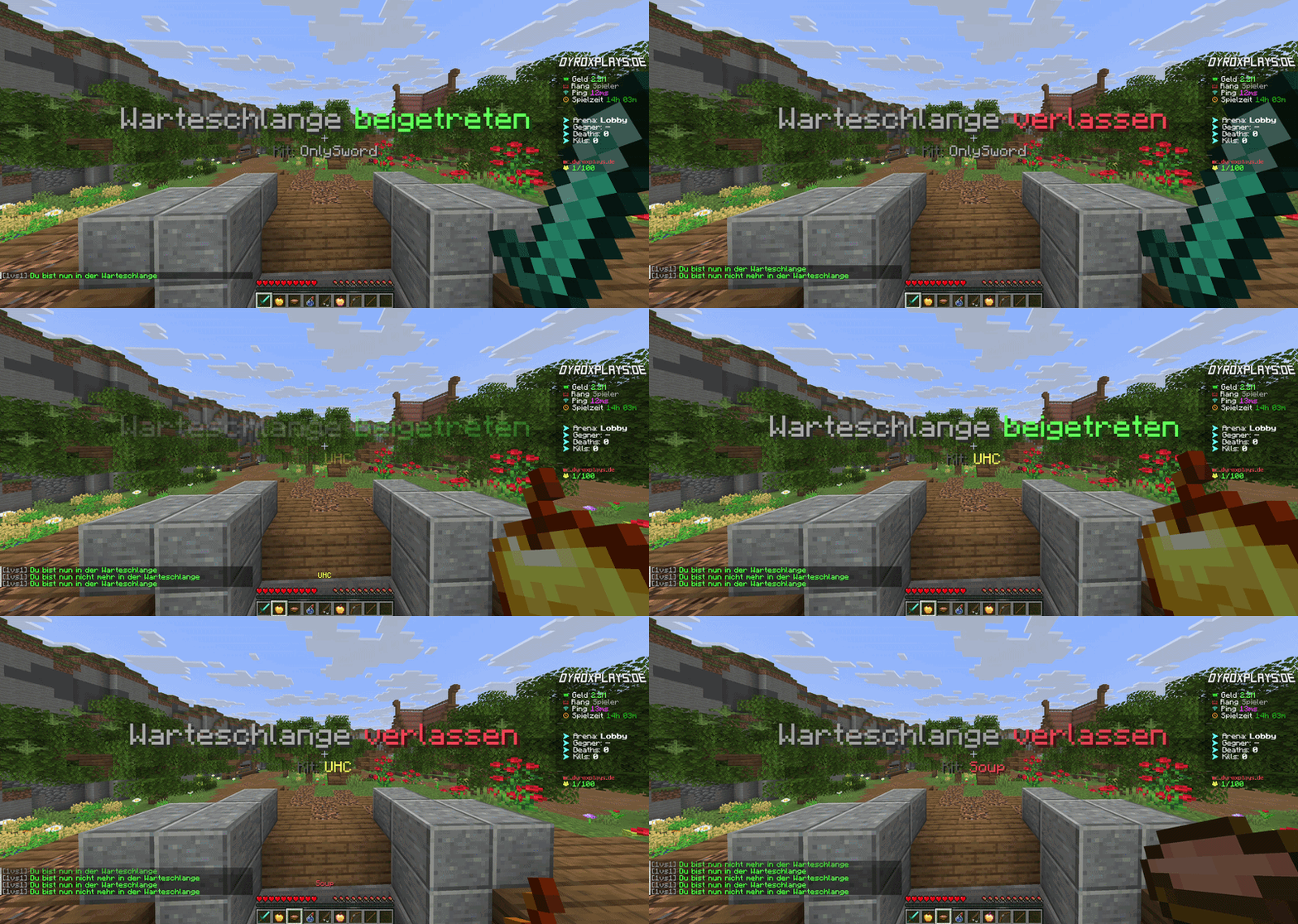
No waiting times! Players can join the queue via the GUI or a lobby item. The system searches for a matching opponent in the background and starts the match fully automatically.
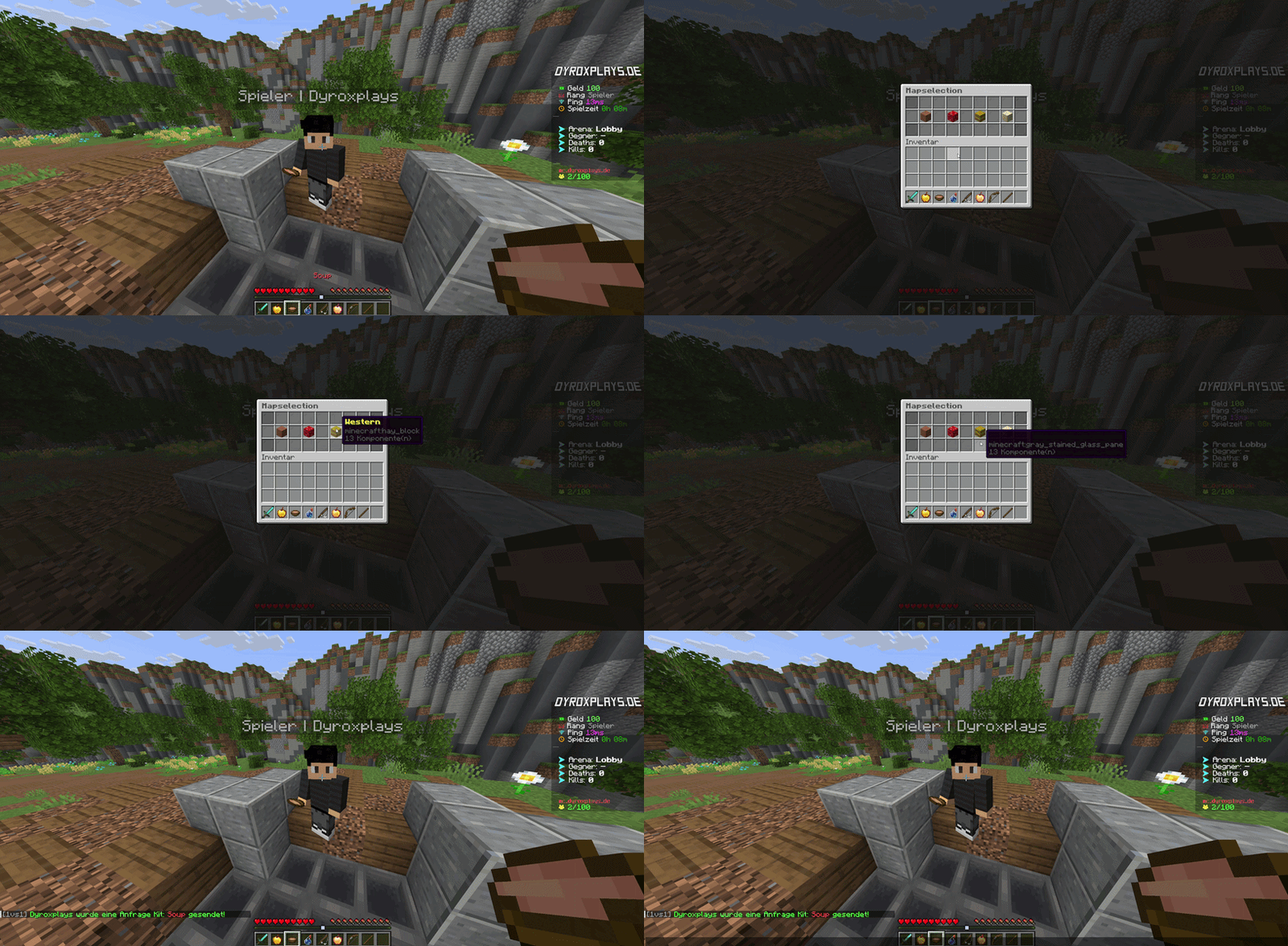
Challenge your friends or enemies! When sending a challenge, a GUI opens in which you can freely determine the desired kit and specific combat arena.
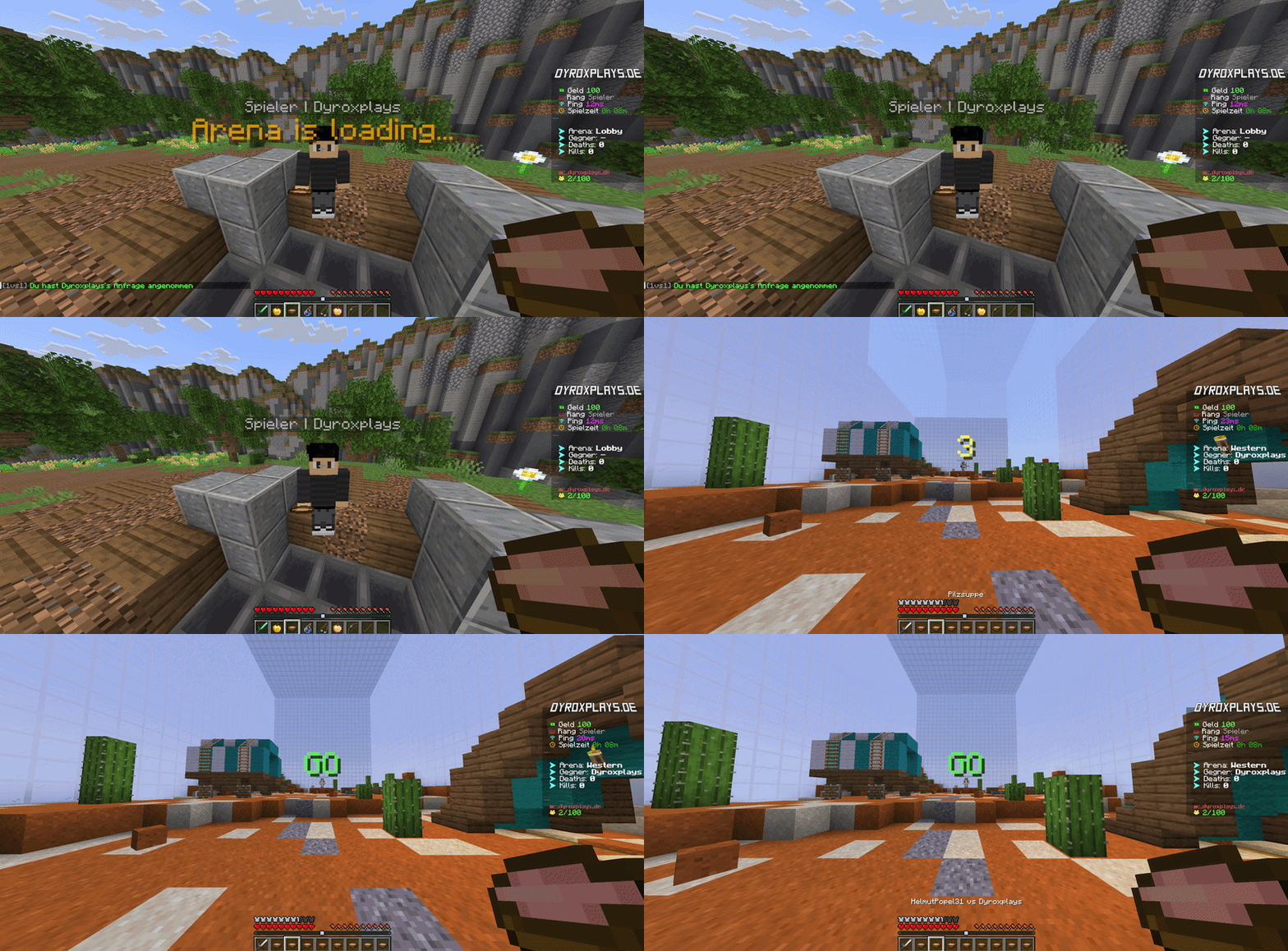
Accepting is extremely simple! One click on the interactive chat button is enough. Alternatively, the challenged player can simply hit the challenger in the lobby with the requested kit item to start the fight immediately. Thanks to automatic arena cloning, an unlimited number of fights can take place simultaneously on the same map.
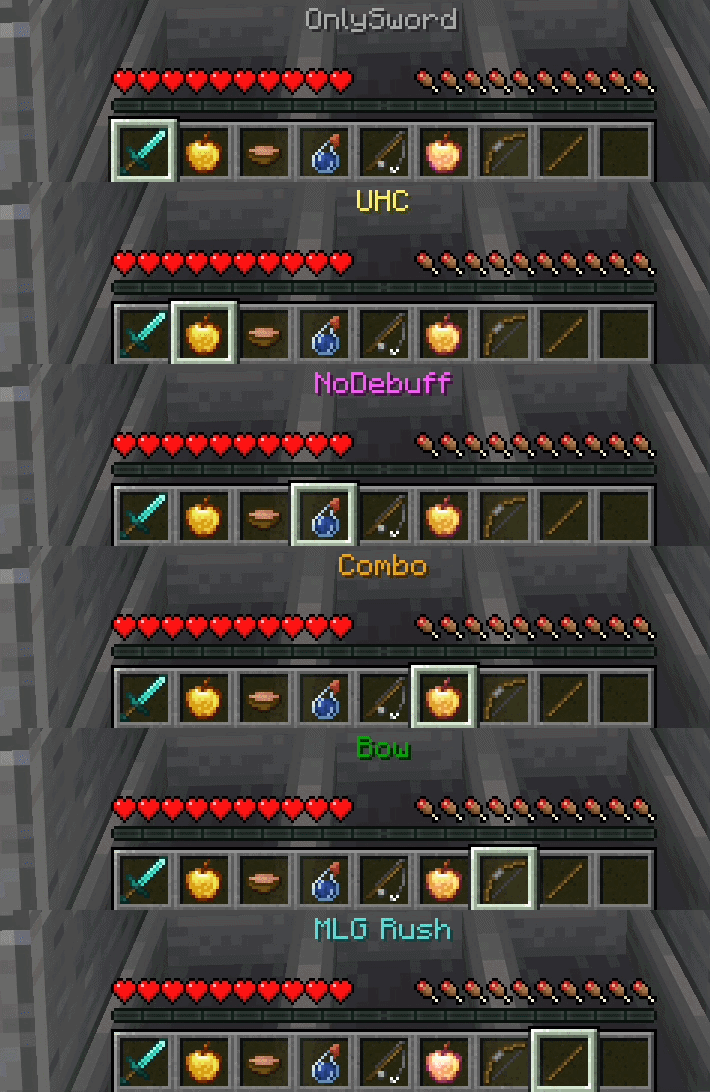
Customize your combat gear perfectly! Set up up to 9 hotbar kits (e.g. Soup, SG, UHC) directly in-game, arrange your items, and save the kit with the command /1vs1 savekit on a hotbar slot for the lobby.
Check the performance of our plugins directly on our test server.
Your server can do more. Take the next step now.
4.7 / 5 · 36+ reviews


This plugin is also available in a bundle.
The 5 best PvP & Minigames in one package: TNTRun, BuildFFA, FFA, 1vs1 and GunGame!
All 5 minigames + ScoreboardPlus: The perfect setup for your minigame network.
FREQUENTLY BOUGHT TOGETHER
Connect hoppers over any distance, build your own storage system and use precise item filters – completely without Redstone.
With Perks, a shop, automatic map change and new MySQL/NoSQL support for maximum performance!
Plugin for voteban, votekick, changing world time to day/night, clearing ground items.
Pay once, with no recurring subscription fees.
For new Minecraft versions, as described on the product page and in the terms.
Get answers directly from the developer.
Settings and features are documented in the wiki.
We do not ask for your real name or postal address to buy and download plugins. Your access requires an email address, a username and your country. Depending on the payment method, the payment provider may request additional information.
Currently, every plugin in the shop comes with an update guarantee. Look for the update guarantee label on the product card. Use the filter to show only these plugins. The exact scope is explained on the product page and in the terms. Read the terms
Your shop license is assigned to your customer account (name-based), rather than a fixed server IP. An IP change therefore does not require a license reset. Our license terms govern how you may use the software. License terms in our Terms of Service
Check supported Minecraft versions, server software and any dependencies on the product page. If you are unsure, discuss your setup with support before buying.
Your download and license are available in the customer area once payment is received. You can return there to access your purchased plugins later. Open customer area
Read what administrators and network owners say about our plugins and support.
Trustpilot 4.7 / 5 Excellent 36+ reviews„Ich bin seit mehreren Jahren Kunde bei dyroxplays.de und komme immer wieder gerne zurück. Der Support ist nach wie vor freundlich, hilfsbereit und schnell erreichbar – das weiß ich sehr zu schätzen.“
„Toller Support, Tolle Plugins.“
„Bin vollkommen zufrieden. Top Plugins und top support. Ich habe schon 4 Plugins gekauft. Wenn ein Plugin Shop dann dyroxplays.de.“
„Sehr Netter Support“
„Super Cooles Plugin und Support einfach top“
„Wer Wert auf Qualität, Ehrlichkeit und einen Support, der diesen Namen auch wirklich verdient, legt, ist hier goldrichtig. Ein Shop, der nicht nur Produkte verkauft, sondern Kundenzufriedenheit ernst nimmt.“
„Immer hilfsbereit, super freundlich und extrem schnell“
Known as a verified seller on